
Minutes nobody billed
A session runs twenty minutes over. Staff round it down, or forget it entirely. Ten times a day, six days a week, that adds up to a salary.
For gaming cafés, pool parlours & esports lounges
Every minute, every snack and every rupee on your floor — tracked, billed and counted.
Floor
Menu
Counter sale
 The CueStation The CueStation Gaming Club
  Game Over 2.0 Game Over 2.0
  Legacy 8-Ball Legacy 8-Ball Café & Lounge
  Root 2 Root 2
  XP Gaming Café XP Gaming Café
 Not theft. Just a busy counter, a full floor, and a hundred small things nobody wrote down.
A session runs twenty minutes over. Staff round it down, or forget it entirely. Ten times a day, six days a week, that adds up to a salary.
A cold drink handed over mid-match, meant to be added to the bill later. It never was.
The drawer says one thing. The register says another. Nobody can tell you which one is right.
PlayVerse does not need anyone to remember. Every minute and every item is attached to a session the moment it happens.
What you get
Every one of them exists because a café owner asked for it.
Live floor management
Every PC, console, pool table and VR rig, laid out the way your room actually is. Start a session in two taps, pause it for a break, move a customer mid-game — the bill follows them.
Learn more about live floor management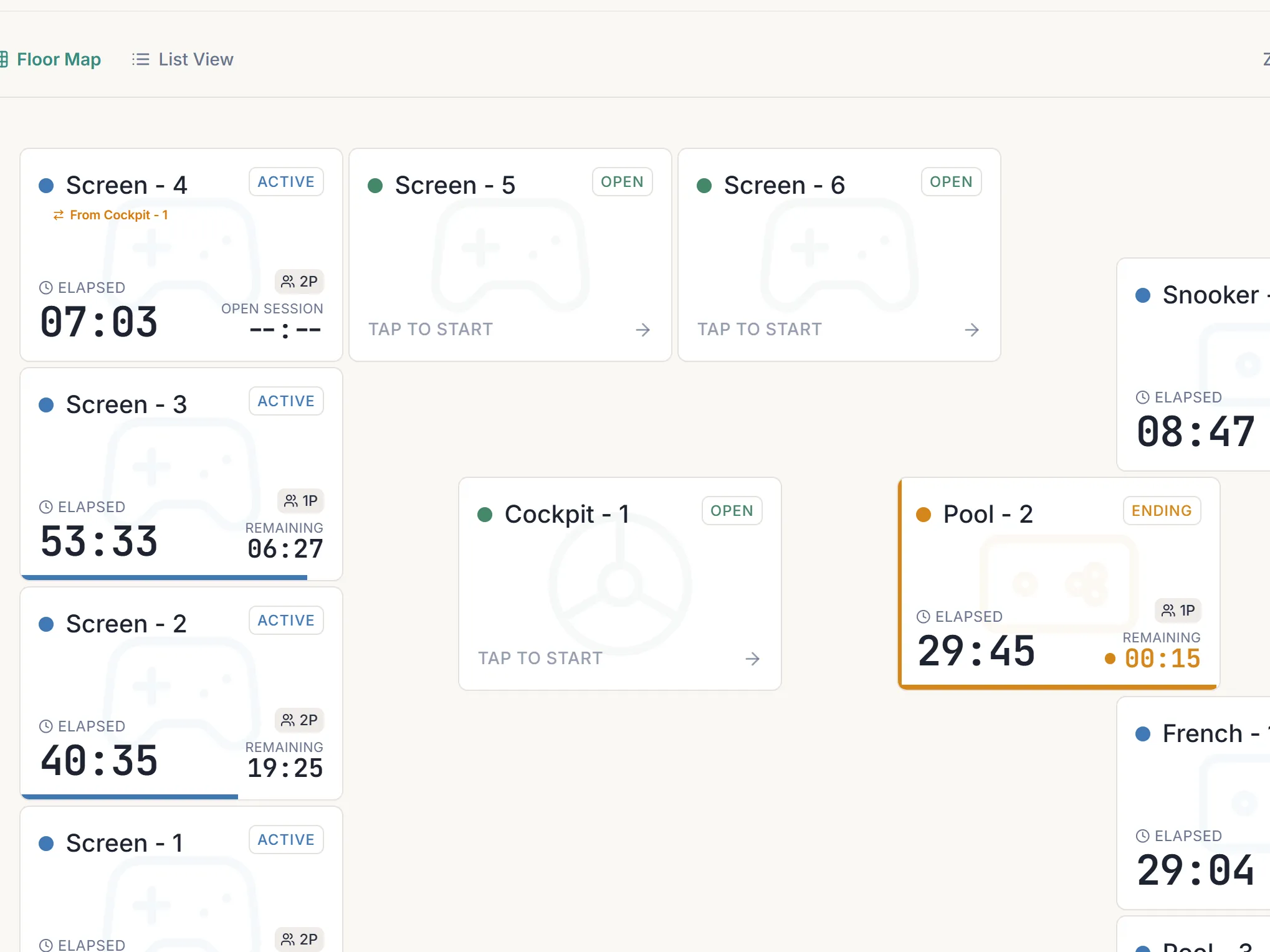
Counter and café, together
The counter and the cafe are not two businesses. A cold drink from the fridge and a plate of momos from the kitchen land on the same session, and the customer pays once on the way out.
Learn more about counter and café, togetherKitchen tickets
An order taken at the table prints in the kitchen a second later. Change it and the kitchen gets a slip showing exactly what moved — old quantity, new quantity — not a fresh ticket to compare by eye.
Learn more about kitchen ticketsLive analytics
Revenue, net profit and expenses for the day, the week or the month, updating as the floor runs. And because your business day runs 6am to 6am, a 1:30am payment lands on the night it belongs to.
Learn more about live analyticsMembers and pay later
Regulars can top up a wallet or put the evening on a tab. A payment clears their oldest charge first, in a fixed order, so any member of staff can point at a date and say that one is settled.
Learn more about members and pay laterTwo reminders first — a week before, then three days before, in the app and on WhatsApp. Continue and nothing changes. Decide not to and you get a week to export everything; the floor stops running for it, then the logins close.
Yes. Analytics, expenses and your member list export to a spreadsheet whenever you want, not only on the way out. The numbers are yours — sessions, sales, members, what each person owes.
No. Staff and admin are separate logins, and the split is enforced on the route, not just hidden in a menu. Staff start sessions, take payments and fire the kitchen. Revenue, expenses and profit are yours.
Yes, if it is a standard thermal receipt printer. There is no hardware to buy from us. You set the printer address, what the ticket header says and whether it buzzes.
Under an hour. We do it with you — your devices laid out the way the room actually is, your rates, and your menu if you are taking the café. You are running the same day, not waiting on an onboarding queue.
Anything with a browser — phone, tablet, or the counter PC you already have, on Windows, Android or Mac. Nothing to install and no minimum spec. It adds to a home screen like an app if you want it there.
That is the normal case. Turn on Session Management by itself and add the café, products or kitchen printing later. You are not charged for a part you have not switched on.
Yes. Each venue keeps its own floor, staff, stock and members, and reports the same way — so the two compare properly instead of needing to be added up by hand.
No card to give us, nothing to pay, and no contract to sign before it. Stop at any point in the 30 days and you owe nothing.
Would rather just talk? Chat on WhatsApp.
‘PlayVerse has really saved our time. Managing the café is much easier now.’
30 days free
Tell us about your venue. We set it up with you on a 10-minute call — your devices, your rates, your menu — and the 30 days start there.
Use it, feel the difference and only then pay for it!
We have your details and will message you on WhatsApp to fix the 10-minute call that starts it.
What happens next